ArrayList – FRQ Practice (AP Computer Science A)
The ArrayList is one of the most frequently tested topics on the AP Computer Science A exam. Master these 15 original AP CSA-style ArrayList practice problems to strengthen your logic on safe insertions, dynamic deletions, and custom object processing.
Students must understand how to add, remove, modify, filter, and search elements inside an ArrayList—often with loops and conditions combined. This page gives you exam-style FRQs to strengthen your data structure logic and exam performance.
Why Practice ArrayList FRQs?
ArrayList FRQs commonly test:
- Adding and removing items safely.
- Filtering elements into new lists.
- Counting and searching for target values.
- Processing lists of custom objects (like a
Studentclass). - In-place mutation of a list.
- Iteration using standard for-loops vs enhanced for-loops.
- Understanding why index manipulation (like
i--) is required when elements shift.
AP CSA ArrayList Methods You Should Know
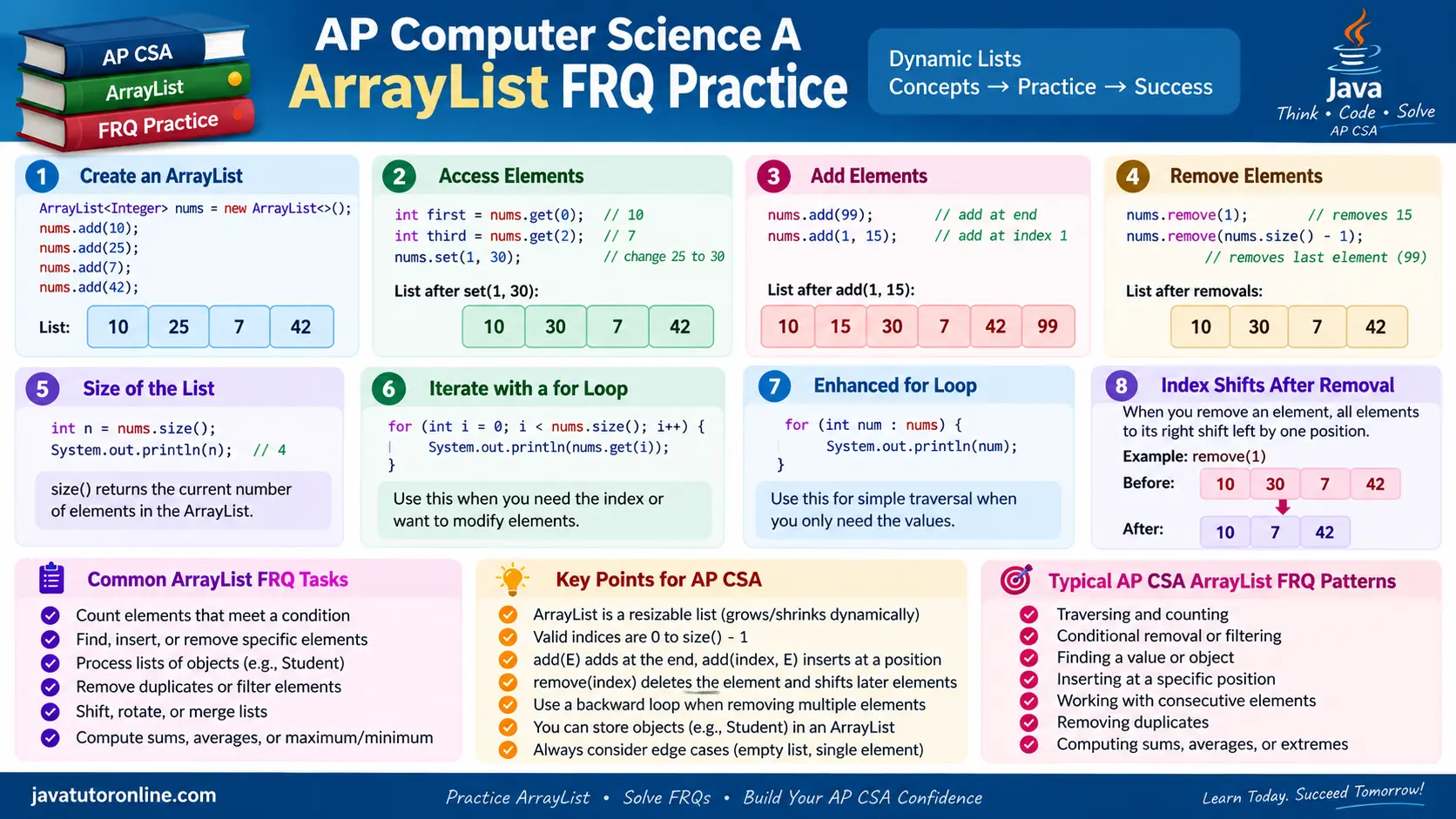
How to Use This Practice Page
- Attempt each problem before viewing the solution.
- Trace index movement on paper, especially during removals.
- Pay attention to why
i--is required when a forward loop deletes an item. - Rewrite solutions from scratch if you miss them.
- Focus on logic, not memorization.
FRQ 1 — Count Values Above a Threshold
Write a method countAbove(ArrayList<Integer> list, int limit) that returns how many values in the list are strictly greater than limit.
[10, 25, 30, 18], limit = 20 → 2
- Traverse the list using an enhanced for-loop.
- Compare each value with
limit. - Increment a counter for each match.
public int countAbove(ArrayList<Integer> list, int limit) {
    int count = 0;
    for (int v : list) {
        if (v > limit) {
            count++;
        }
    }
    return count;
}- Using
>=instead of strictly>. - Returning the value itself instead of the accumulated
count.
FRQ 2 — Count Strings Containing a Letter
Write a method countContaining(ArrayList<String> list, String letter) that returns how many strings contain letter.
[“cat”, “dog”, “car”], “a” → 2
- Loop through the list with an enhanced for-loop.
- Use the String method
indexOf()to check whether the target text occurs in the string. - Count the matches.
public int countContaining(ArrayList<String> list, String letter) {
    int count = 0;
    for (String s : list) {
        if (s.indexOf(letter) != -1) {
            count++;
        }
    }
    return count;
}- Using
==instead of.equals()if trying to match the exact string. - Ignoring case sensitivity (though typically standard on basic AP exams unless specified).
FRQ 3 — Find First Matching Object
Write a method findStudent(ArrayList<Student> list, String name) that returns the index of the first Student whose name matches name. If not found, return -1.
For a list containing Student objects named “Amit”, “Riya”, and “John”: “Riya” → 1
- Traverse using a standard loop so you have access to the index
i. - Call the
getName()method on the object, and use.equals()to compare strings. - Return the index immediately when found to short-circuit the loop.
public int findStudent(ArrayList<Student> list, String name) {
    for (int i = 0; i < list.size(); i++) {
        if (list.get(i).getName().equals(name)) {
            return i;
        }
    }
    return -1;
}- Using
==for String comparison instead of.equals(). - Returning the
Studentobject itself instead of the requested integer index.
FRQ 4 — Remove All Negative Numbers
Write a method removeNegatives(ArrayList<Integer> list) that removes all negative values from the list.
[5, -2, 7, -1] → Modifies list to [5, 7]
- Traverse the list using a standard loop.
- When an element is removed, all elements to the right shift left. Therefore, you must decrement the index (
i--) so you don’t skip evaluating the element that just slid into the current spot.
public void removeNegatives(ArrayList<Integer> list) {
    for (int i = 0; i < list.size(); i++) {
        if (list.get(i) < 0) {
            list.remove(i);
            i--; // Adjust index because elements shifted left
        }
    }
}- Forgetting
i--after removal. If two negative numbers are adjacent, the second one will be skipped. - Trying to use an enhanced for-loop while modifying the list, which causes a
ConcurrentModificationException.
FRQ 5 — Remove Short Strings
Write a method removeShortStrings(ArrayList<String> list, int minLength) that removes all strings strictly shorter than minLength.
[“hi”, “hello”, “java”], minLength = 4 → Modifies list to [“hello”, “java”]
- Check the length of the string at index
iusing.length(). - Remove if the condition fails.
- Manually step back the index (
i--) immediately after the removal to check the next element that shifted down.
public void removeShortStrings(ArrayList<String> list, int minLength) {
    for (int i = 0; i < list.size(); i++) {
        if (list.get(i).length() < minLength) {
            list.remove(i);
            i--;
        }
    }
}- Skipping elements after removal by forgetting
i--. - Using
length()incorrectly or reversing the comparison condition. The requirement is to remove strings strictly shorter thanminLength.
FRQ 6 — Insert After Target Word
Write a method insertAfter(ArrayList<String> list, String target, String toAdd) that inserts toAdd immediately after every occurrence of target.
[“a”, “b”, “a”], target=”a”, add=”x” → Modifies list to [“a”, “x”, “b”, “a”, “x”]
- Traverse the list forward.
- When you insert a new element at
i + 1, it pushes everything to the right. You must manually push your loop counter forward by an extra step (i++) to skip over the newly created element.
public void insertAfter(ArrayList<String> list, String target, String toAdd) {
    for (int i = 0; i < list.size(); i++) {
        if (list.get(i).equals(target)) {
            list.add(i + 1, toAdd);
            i++; // Skip over the newly inserted value
        }
    }
}- Causing an infinite loop due to a missing index increment. If
targetandtoAddare the same word, failing to skip it will continuously duplicate the element until memory runs out.
FRQ 7 — Shift List Left
Write a method shiftLeft(ArrayList<Student> list) that shifts all elements one position to the left. The element originally at the front should move to the back.
[A, B, C] → Modifies list to [B, C, A]
- Store the first element in a temporary variable.
- Call
.remove(0), which automatically slides all other elements to the left. - Call
.add()to place the stored element neatly at the end of the list.
public void shiftLeft(ArrayList<Student> list) {
    if (!list.isEmpty()) {
        Student first = list.remove(0);
        list.add(first);
    }
}- Forgetting to check if the list is empty (
!list.isEmpty()orlist.size() > 0), causing anIndexOutOfBoundsException. - Writing complex manual looping code to shift elements.
FRQ 8 — Remove Adjacent Duplicate Strings
Write a method removeAdjacentDuplicates(ArrayList<String> list) that removes all consecutive duplicate strings from the list.
[“a”, “a”, “b”, “b”] → Modifies list to [“a”, “b”]
- Start a loop at index 1.
- Compare each element at
iwith the previous element ati - 1. - If they match, remove the duplicate and manually decrement
i.
public void removeAdjacentDuplicates(ArrayList<String> list) {
    for (int i = 1; i < list.size(); i++) {
        if (list.get(i).equals(list.get(i - 1))) {
            list.remove(i);
            i--;
        }
    }
}- Starting the loop at
0, resulting in anIndexOutOfBoundsExceptionwhen attempting to check index-1. - Forgetting to decrement the index after removal.
FRQ 9 — Remove Students Below Average Score
Write a method removeBelowAverage(ArrayList<Student> list) that removes all students whose score is below the class average.
Assumption: The list contains at least one Student.
- Compute the average score with a first pass through the list. Ensure you use
(double)to avoid integer division truncation. - Traverse the list a second time with a standard loop, calling
getScore()on each object, and remove those below the average (remembering to decrementi--).
public void removeBelowAverage(ArrayList<Student> list) {
    int total = 0;
    for (Student s : list) {
        total += s.getScore();
    }
    double avg = (double) total / list.size();

    for (int i = 0; i < list.size(); i++) {
        if (list.get(i).getScore() < avg) {
            list.remove(i);
            i--;
        }
    }
}- Using integer division for the average calculation.
- Attempting to remove elements inside the first enhanced for-loop, causing a
ConcurrentModificationException.
FRQ 10 — Remove Longest Strings
Write a method removeLongest(ArrayList<String> list) that removes all strings that have the maximum length in the list.
Assumption: The list contains at least one string.
[“hi”, “hello”, “java”] → Modifies list to [“hi”, “java”]
- Find the maximum string length using a first pass traversal.
- Traverse the list a second time and remove any strings that perfectly match that maximum length.
public void removeLongest(ArrayList<String> list) {
    int max = list.get(0).length();
    for (String s : list) {
        max = Math.max(max, s.length());
    }

    for (int i = 0; i < list.size(); i++) {
        if (list.get(i).length() == max) {
            list.remove(i);
            i--;
        }
    }
}- Attempting to remove strings during the very first pass while still calculating the maximum length. You cannot know what the maximum length is until you check every element once!
FRQ 11 — Merge Two Sorted Integer Lists
Write a method merge(ArrayList<Integer> a, ArrayList<Integer> b) that merges two already sorted integer lists into a single, brand new sorted list.
- Use two independent pointers (
iandj). - Compare values from both lists and insert the smaller value into the result list.
- After one list runs out, use
whileloops to dump all remaining elements from the other list.
public ArrayList<Integer> merge(ArrayList<Integer> a, ArrayList<Integer> b) {
    ArrayList<Integer> result = new ArrayList<Integer>();
    int i = 0, j = 0;

    while (i < a.size() && j < b.size()) {
        if (a.get(i) <= b.get(j)) {
            result.add(a.get(i));
            i++;
        } else {
            result.add(b.get(j));
            j++;
        }
    }

    while (i < a.size()) {
        result.add(a.get(i));
        i++;
    }
    while (j < b.size()) {
        result.add(b.get(j));
        j++;
    }

    return result;
}- Forgetting to add the remaining elements. If list
Aempties before listB, you still need to append the rest ofB.
FRQ 12 — Partition Students by Passing Status
Write a method partitionPassing(ArrayList<Student> list) that reorders the list in-place so that all passing students appear before all failing students.
- Create a temporary, empty list.
- Run a first pass to add all passing students to the temp list.
- Run a second pass to add all failing students.
- Clear the original list and dump the temp list back into it.
public void partitionPassing(ArrayList<Student> list) {
    ArrayList<Student> temp = new ArrayList<Student>();

    for (Student s : list) {
        if (s.isPassing()) temp.add(s);
    }
    for (Student s : list) {
        if (!s.isPassing()) temp.add(s);
    }

    list.clear();
    for (Student s : temp) {
        list.add(s);
    }
}- Attempting to modify and shift elements within the original list during a single loop, which almost guarantees out-of-bounds exceptions and lost data.
FRQ 13 — Count Unique Strings (Sorted List)
Write a method countUnique(ArrayList<String> list) that returns the number of unique strings. Assume the list is already sorted alphabetically.
- Since the list is sorted, any duplicates will be sitting right next to each other.
- Compare each element with the previous one. Only increment your unique count when the current string does not equal the previous string.
public int countUnique(ArrayList<String> list) {
    if (list.size() == 0) return 0;

    int count = 1; // The first item is always unique
    for (int i = 1; i < list.size(); i++) {
        if (!list.get(i).equals(list.get(i - 1))) {
            count++;
        }
    }
    return count;
}- Forgetting that the first element initializes the baseline count to
1. - Going out of bounds by starting the loop at
0and attempting to accessi - 1.
FRQ 14 — Find Student With Highest Score
Write a method findTopStudent(ArrayList<Student> list) that returns the actual Student object with the highest score.
Assumption: The list contains at least one Student.
- Track the “best” student by storing a reference to the actual
Studentobject, initializing it to index 0. - Compare the score of the current student to the score of the best student, updating the reference when necessary.
public Student findTopStudent(ArrayList<Student> list) {
    Student best = list.get(0);
    for (Student s : list) {
        if (s.getScore() > best.getScore()) {
            best = s;
        }
    }
    return best;
}- Returning the integer index instead of the
Studentobject. - Comparing the objects directly (
s > best) instead of calling the integergetScore()method.
FRQ 15 — Running Total of Integers
Write a method runningTotal(ArrayList<Integer> list) that converts the list into a running total list by modifying it in place.
[2, 3, 5] → Modifies list to [2, 5, 10]
- Maintain a cumulative
sumvariable. - As you loop through, add the current index’s value to the sum, and immediately overwrite that index with the new sum using
list.set().
public void runningTotal(ArrayList<Integer> list) {
    int sum = 0;
    for (int i = 0; i < list.size(); i++) {
        sum += list.get(i);
        list.set(i, sum);
    }
}- Creating and returning a brand new list instead of modifying the original list in-place via
.set().
Frequently Asked Questions
What is the difference between an Array and an ArrayList?
An array has a fixed size that cannot be changed once created, and uses bracket syntax (arr[i]) for access. An ArrayList can grow and shrink dynamically, but can only store object references (like Integer or String), and requires methods like .get() and .set().
Why do I have to adjust my index (i--) when removing from an ArrayList?
When you call .remove(i), all elements to the right of index i instantly shift one spot to the left to fill the gap. If you let the loop naturally increment (i++), the element that just shifted into the position you are currently evaluating will be skipped over entirely on the next iteration.
Is looping backwards a better way to delete elements?
Yes. Looping backwards is a useful technique when deleting elements from an ArrayList. Because elements shift left after a removal, processing from right to left avoids skipping elements and eliminates the need for an i-- adjustment.
Can an ArrayList hold primitive types like int or double?
No. ArrayList can only hold objects. To store numbers, you must use their Wrapper classes (Integer or Double). Java handles the conversion automatically through a process called auto-boxing and auto-unboxing.
Are these official College Board FRQs?
No. These are original, custom-designed AP CSA–style practice problems created for additional practice. They are not released College Board questions.
FRQ Strategy Tips for ArrayLists (AP CSA)
- Delete safely: Either manually adjust your index (
i--) inside a forward loop, or just loop backwards to avoid the problem entirely. - Insert carefully: When looping forward and adding elements, remember to increment your index (
i++) an extra time to skip the inserted element and avoid infinite loops. - Use the correct size method: Use
list.size()with parentheses, never.length. - Check object equality: Use
.equals()when comparing Strings or Custom Objects in a list, never==. - Write clear, logically structured solutions and verify you have returned the requested data type (modifying in-place vs returning a new list).
Related FRQ Pages
- Arrays – FRQ Practice
- Strings – FRQ Practice
- 2D Arrays – FRQ Practice
- Classes & Objects – FRQ Practice
- Mixed FRQs
- Mock FRQ Sets
Need Structured Help With AP Computer Science A?
If you want guided, one-on-one support for AP Computer Science A—including FRQs, MCQs, debugging, and exam strategy—you can explore my private AP CSA online tutoring program.
Ideal for students targeting a score of 4 or 5 on the AP CSA exam.
WhatsApp: +91 9853166385
Email: javatution@gmail.com
Book a free demo: Contact Chinmay